Friday, January 3, 2014

Blogging in the new year

*this is a re-post from my new blog, techiestateofmind.blogspot.com*


Hey 2014, let's get blogging... A new year, a fresh perspective, a renewed vision. 

The past couple of years, as an ELL teacher, I had a pretty clear sense of my blogging focus: ed tech tools and resources that enhanced English language teaching and learning.  It was a specific topic, and I found my blogging rhythm (fairly) quickly.  This year, in my new position as a technology integration specialist, it's been harder for me to focus in on one specific theme for my blog....and as a result, I haven't quite established my blogging routine...yet. 

Over winter break, I had a chance to do some reflecting on my blog and the direction I'd like to take it in the new year.   I realized that there are basically three kinds of ed tech blog posts that I love to read, talk about, and write:

  • content curation, reflection, and response
  • successes and/or failures with an app, tool, or resource
  • content generation, brainstorming, creative expression


    So, I've decided to use those three categories as guides to help me focus my blogging in 2014.

    And what better time to start...than the present.


    http://sociallysorted.com.au/
    wp-content/uploads/2013/08/
    Canva-Image-.jpg

    One of my favorite techie tools out there is a free graphic design website called Canva.  Although this site was not designed specifically for educators, I have loved using it to help me design and publish graphics for presentations, posters, websites, my blog, logos, and even my family holiday card.  I love graphic design, and have been on the look-out for an easy-to-use, free graphics resource.  It is currently in Beta and in order to use it, you sign up for an invite - I got mine in a day or two. 


    Pros:
    Canva currently provides templates for 11 different design platforms / sizes:
    • Business card
    • Invitation
    • Poster
    • Photo collage
    • Card 
    • Social media
    • Facebook cover image
    • Blog graphic
    • Presentation
    • Document
    • Christmas card
    Once you choose a design type, you have over 1,000,000 images to choose from to build your design.  Most are free - those that aren't free cost $1.00.

    You can customize your design by changing the color, text, size, layout, combination, and alignment of the different images.

    You can share your design directly to Twitter and Facebook, you can email a link to it, or you can download it to your computer to print or share.

    You can give your friends instant access to Canva once you sign up - sharing really is caring when you find an awesome resource.


    Cons:
    At this point, the only con I've discovered while using Canva is that it doesn't yet have an EDU version to make sure the graphics are filtered for student use.  Even so, I love it as a tool for my own teaching and graphic design, and highly recommend that you give Canva a try!


    What are your blogging resolutions for 2014?  

    How do you structure and focus your blog?  

    Have you tried out Canva or another, similar tool?  


    I'd love to hear from you - please share your comments below!


    Wednesday, October 30, 2013

    Balance is Key

    This is a repost from my new blog, techiestateofmind.blogspot.com.

    -----------------------------------------------------------------------------------------------------------------------

    It's hard to believe it's almost November -- the first few months of school have flown by, and at times, I feel like I've hit a stride in my new position as a technology integration specialist.  At the same time, there are definitely days when I feel I am still just beginning to figure out my new role. 

    As I transition and adapt to my new job, I am learning and realizing more about myself than I had realized I would - for example, I have always been an idea person.  I love to brainstorm and collaborate on new ideas and I love to be a part of putting the ideas into practice.  The flip side of this is that I'm not fond of missing out on opportunities to collaborate, and I don't like to say no.  It only took a week straight of not having time to eat lunch for me to realize I need to carve out time to eat each day...or it might not happen (lunch and prep are great times to meet and collaborate with classroom teachers!).  Did I mention I'm an extrovert?!

    So, I'm striving to find balance. 

    http://www.seemsartless.com/photos/full/rock-balance.jpg


    A balance between time to collaborate and time to work, create, and complete tasks on my own.  A balance between saying yes and saying no -- or, maybe, I can't at that time. 

    Balance between learning and reflecting;
               gathering new ideas and implementing;
                                              big ideas and the details.


    The hardest area for me to find balance has been in setting limits with work after hours to honor the time I want to dedicate to my home life  (I love to cook, but haven't been able to during the week for a while....and there's been a mounting pile of laundry staring me down for the past several days...).  I am striving to find balance.

    How do you find balance?  How to you maintain it?  Is there an app for that? 

    Thanks for sharing your ideas and comments below!

    Thursday, October 17, 2013

    Failing in Public

    This post has been re-posted from my new blog - visit it directly at techiestateofmind.blogspot.com.

    Tonight during a livesession conversation on "Using Connectivism" as a part of #ooe13, another participant, +Greg McVerry @jgmac1106, talked about publishing blog posts and then editing and revising them continuously after publishing.  He mentioned that blogging sometimes acts as his life's rough draft, which I think holds a lot of truth for many bloggers out there. As he was sharing this, I reflected on my own blogging practices and realized that, more often than not, I take too long to filter through, edit, and revise my ideas before publishing them. The end result is often that I reach my historical "one blog post per month" limit.

    I am determined to change this practice. I'm shifting my blogging mindset so that my blog writing  better reflects my thinking as it evolves.  This means getting comfortable with the idea of "failing in public" and "failing out loud".  I'm not always going to be on the right track or know the right answer, but I'll definitely be doing a lot of thinking along the way.  Our #ooe13 chat spent quite a bit of time discussing the value of taking risks through blogging and Tweeting to share and question our thinking, and to co-construct an understanding of a topic with our PLNs.  Far too often, failure is seen as a negative thing instead of a chance to create meaning through developing understanding.  

    image: http://www.quotesonimages.com/109993/fail-first-attempt-in-learning-2


    Failing has been on my mind a lot lately... I recently pinned a poster on Pinterest that said FAIL: first attempt at learning. I'm going to put it up in my office to help remind myself of the value of failure (I'll bet it might lead to some good conversations, too).  As a teacher at a STEM school, we teach our students that failure is a very necessary part of the engineering and design process.  Why shy away from failure as teachers?  Or from sharing our experiences with failure?  After all, the reflection that happens after failure often leads to great learning!


    I am excited to embrace failure in public by using my blog as a sounding board instead of a final product. I'd love to hear your take on the idea of failing in public-- feel free to post a comment below!

    Sunday, September 22, 2013

    State of Mind for the New School Year

    Re-posted from my new blog: techiestateofmind.blogspot.com

    Starting a new job this year has given me a great opportunity to really think through my state of mind for the new school year.  By state of mind, I mean mentality, self talk, mindset, the way we mentally prepare ourselves to handle what comes our way.  


    http://ec.l.thumbs.canstockphoto.com/canstock11504161.jpg
    After being an ELL teacher for five years, this is my first year as a technology integration specialist, and I decided to go into the year with an open mind (I know for a fact there are many ways to reach a desired outcome), humility (I know I’ll have a lot to learn on the job), and a ‘no fear’ state of mind (Take a risk -- go big, or go home, right?).  


    http://www.fontspace.com/jonathan-s-harris/no-fear

    I have found that the three mentalities are really interrelated – Starting with being open to hearing about new ideas, then on to being ready to take a risk to try them out, and ending with being humble, yet reflective when/if they don’t work out as planned…or if they work out better than planned!   

    I’ve already had several opportunities to try out my new state of mind.  One such opportunity involved collaborating with our school’s library media specialist on talking with the 6th graders about our responsible use policy and what it means to be good digital citizens.  The LMS and I openly discussed our ideas and came up with a project that gave our students a chance to create a public service announcement to share our responsible use policy with other students and staff at our school (using Google Slides or Glogster).  We were both open to each other’s ideas, and were excited to take a risk and put our ideas into practice with the 6th grade classes.  After teaching the first section of 6th grade, we had a few minutes to talk through how things went, and we realized there just wasn’t enough time to teach both Google Slides and Glogster, so we decided to focus on Google Slides for the other sections.  (This required some humility on my part, because I had really hoped to use Glogster.)  The next sections went well, although we still wished we had had more time with each class.  We met together after teaching all of the sections to reflect and revise our plan for next time.  It was a great experience, and was made even better by the fact that both of us were open minded, took risks and were humble and reflective about the experience.
    This experience also got me thinking about our students’ state of mind.  What is their mentality when they come to school?  What do they tell themselves when they encounter a problem or new situation?  

    After reading Mindset by Dweck and Habits of Mind Across theCurriculum by Costa and Kallick, I think state of mind and the skills that enable us to possess various states of mind are things we need to explicitly teach our students.  Students need to know that hard work, a growth mindset, persistence, inquiry, collaboration, and a sense of humor (among others) are critical skills to develop for school and beyond.  These skills are especially useful when students and teachers are working with technology – sometimes technology works well and sometimes it doesn’t work at all (can we add patience to the state-of-mind list?).

    As the school year unfolds, I will continue to focus on being open-mind, humble, and a risk-taker in my new position.  I will also model and discuss these skills, as well as other habits of mind, with my students, with the hope that they will begin to adopt and adapt these skills into their own state of mind for this school year.
    How about you?  What is your state of mind for this school year?  What are you focusing on?  How do you teach these skills to your students?  Post your ideas in the comments below, or contact me on Twitter @wilsandrea.

    Monday, July 22, 2013

    edcampHome: collaboration at its finest!

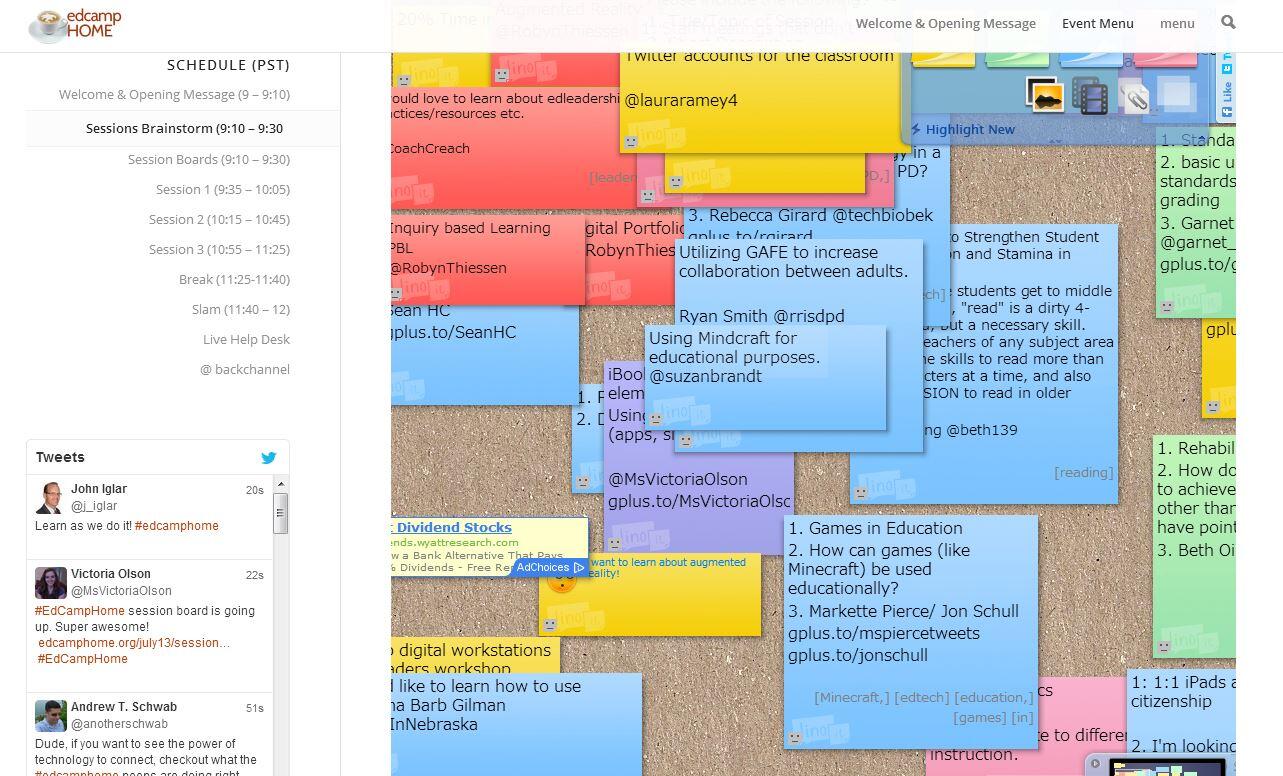
    This past Saturday, I had the opportunity to participate in edcampHome, an amazing take on the traditional edcamp experience, in which participants tuned in from home (or anywhere else with an internet connection) to take part in the online edcamp in real time via Google hangouts, Linoit boards, Twitter, Today's Meet, and Google +.

    The incredible organizers, +David Theriault , +Kelly Kermode , +Shawn White , and +Karl Lindgren-Streicher, deserve huge amounts of credit for planning and orchestrating this awesome experience.  If you want to see an example of true collaboration, check out even a few minutes of their continuous live Google hangout during edcampHome:


    So, what was so powerful about edcampHome?  

    After a few days of pondering over my response to this question, here's what I took away from the edcampHome experience:


    Enthusiasm and passion are contagious.

    So, find something you are excited about and talk it up with others.  Your excitement, enthusiasm and passion will be evident in the way you talk, and you will soon have others interested and excited about it too.

    As teachers, we know this to be true - we employ this strategy in our teaching, because we know that if we are passionate and excited about what we are teaching, we can (usually) get students excited about it as well.

    But, when was the last time we experienced this paradigm of passion-based teaching and learning in professional development?  That's the magic of edcamp.  Teachers come together to share and discuss things they are passionate about. The enthusiasm catches on, and teaching and learning happen seamlessly through collaboration.

    Image created by +Kevin Ashworth 
    At edcampHome, I experienced this passion-based teaching and learning through the session I moderated on augmented reality.  I have been interested in learning more about augmented reality in education ever since I heard folks talking about the awesomeness of @Aurasma on Twitter.  As our session began, we started out with a few questions about what augmented reality is, and how it could work in education. Then +Charity Harbeck and +Charles Cooper started sharing some of their experiences with using augmented reality and their favorite tools and resources.  I was inspired just listening to them!  Their passion and excitement were contagious, not only for those of us participating in the Google hangout session with them, but also for those listening in through the live feed on YouTube - I received (and am still receiving) tweets from people wondering about links to the resources shared in our session.  Now that's awesome.


    Here's the recorded broadcast of our session:

    And here are some links to the augmented reality tools and resources we discussed:


    Collaboration requires communication, planning, investment from all sides, a bit of ad libbing, flexibility, and a good sense of humor.

    As a teacher of English learners, a large part of what I do is collaborating with classroom teachers.  It's not always easy, as many out there will attest.  First of all, there never seems to be enough time in the day to communicate and plan as much as we'd like.  And then, things change on a whim, and you and your co-teacher have to be flexible and come up with something on the fly.  (Sometimes I feel this ad libbing is where my best teaching comes out!).  And then, you have to be able to reflect together on how things went so that you can pick up where you left off (this is often where the sense of humor comes in handy).  


    Collaboration isn't always visible for others to see.  They may see you planning together with your co-teacher, hear you talking about a great (or failed) lesson, or walk by and see you teaching together with your co-teacher.  But rarely do others get to witness and take part in the inner workings of your collaboration.  


    --Enter edcampHome.  Collaboration was the building block of the day.  The edcampHome organizers were excellent examples of this.  From the planning of the event, to the opening message, to scheduling sessions, to trouble-shooting and technical issues, they worked together and collaborated....and, their collaboration was visible to us all because it happened on their live broadcast of their Google hangout.  It was awesome!


    Not to mention the collaboration that happened among participants during the session brainstorming and in the sessions themselves....all of which was broadcast live and archived on YouTube and the edcampHome website.  Check out the archived videos to see examples of collaboration in action!


    Our session brainstorming board using Linoit board
    Image courtesy of +Kristina Campea
    https://twitter.com/TchEngRox/status/358623156237385728/photo/1


    We are all experts.

    Even if we don't think we are.  Our questions, experiences, connections, and thoughts make us all experts on something.  And sometimes, all it takes to reveal our inner expert is a meaningful conversation with others on a topic of interest.  That, and the opportunity to share what we know in open and authentic ways, such as during an edcampHome session discussion on Twitter for professional development, 20% time, Google Apps, or Minecraft in Edu (check out the edcampHome website to see some of these discussions in action).   There's something validating about sharing what you've tried in your classroom and hearing that others are interested in hearing more about how you did it or seeing how it could work for them.  

    The SLAM at the end of edcampHome was one more opportunity for people to share their learning and let their inner expert shine.  It was pretty cool to see that many participants who signed up for the SLAM were actually first time edcampers who were fired up about the idea of brining edcamp back to their city or school.   

    I think the idea that we're all experts is a really powerful one to bring back to our students and staff.  Why not let students SLAM (share) something they are really excited about during a designated time in class?  Why not give time during staff meetings or PD for staff to SLAM some cool things they are doing in their classrooms (kudos to +Karla Juetten and +Laurie Toll for piloting this at our school last year!)?  After all, sometimes we don't realize we're experts until we're given a chance to share.


    EdcampHome was an amazing experience, and I loved being a part of it!  I am looking forward to sharing some ideas from this edcamp with the edcampMSP team (coming up: Oct. 12, 2013 in MN).  And, I am excited to see what the second iteration of edcampHome will bring!


    Tuesday, June 18, 2013

    Staying Connected During the Summer

    Summer...

    Image: http://upload.wikimedia.org/wikipedia/commons/8/8e/Pose_lake_Minnesota.jpg

    ...a time for educators to 
    relax, reflect, recharge, and refresh....

    Image: http://www.alwayshomellc.com/images/rural-concierge-service-5.jpg


    ...as well as a time to reconnect, rethink, reconfigure, and redesign.

    I'm going through my copy of
    Comprehension &Collaboration: Inquiry Circles in Action by Harvey and Daniels for the third time.

    And most of us don't stop there. 


    We take to heart the idea that summer is also a time for 

    ...learning, growing, exploring, pursuing, planning, collaborating, and innovating...


    via several mediums, including:

    Twitter, Google + and other social networks,


    Google Apps,


    conferences,


    MOOCs,


    blogs / blogging,


    researching,
       
    Image: http://farm6.staticflickr.com/5219/5387630438_f9f50305a7.jpg


    and pursuing opportunities for 

    incredible collaboration and training, 

    such as the Google Teacher Academy in Chicago.


    Check out my application video - 
    it would be an honor to be chosen to participate!


    How do you stay connected during the summer?


    Saturday, May 25, 2013

    21st Century Learning Skills: From 4 Cs to 5

    I was recently asked what I think is the most important aspect of my school's STEM model, and as I thought about it, it wasn't the science, technology, engineering, or math that we integrate into every content area, but rather the inquiry and curiosity that we encourage, foster, demonstrate and practice through our STEM model.

    Students and teachers alike are curious about the world around them, hungry for more information about why things work the way they do and how to make them work even better.  This curiosity is what ignites a passion for learning in our students and staff, and pushes us all to be innovative thinkers.

    http://www.p21.org/tools-and-resources/abovebeyond4cs
    We often refer to the 4 Cs of 21st century learning ...

    • critical thinking
    • communication
    • creativity
    • collaboration
    ...and their importance in preparing students for success in a digital, connected world.  These skills are incredibly important, and providing the time, structure and tools to practice them in school is crucial.  

    However, I would like to propose adding a 5th C to the list:

    Logo Design by FlamingText.com
    Logo Design by FlamingText.com

    Without curiosity, students' intrinsic motivation for learning would be squelched.  They would never wonder, never ask questions, never push themselves to try again after failing....  But, just as with the 4 Cs, or any skill, students need to see curiosity in action through teacher modeling, they need the time, structure and tools to practice channeling their curiosity into inquiry, research and learning, and they need meaningful ways to share their discoveries, challenges and reflections along the way.

    Curiosity would also fit well with ISTE's NETS*S standards, as it goes hand-in-hand with each of the existing six standards (from which the 4 Cs are taken):
    http://www.iste.org/standards/nets-for-students

    For English learners, curiosity and inquiry are especially important.  Students who are developing their English language skills in speaking, listening, reading and writing may not yet be able to fully express their curiosity on a topic (according to second language acquisition theory, most learners begin forming simple questions in the speech emergence stage, after about one to three years of studying/learning English), however, their curiosity can help engage them in activities where they can authentically practice using academic vocabulary, asking questions, and sharing their own experiences on the topic.  

    You can help your English learners, among others, to access the content by pre-teaching and posting related academic vocabulary and engaging students in activities to activate their prior knowledge on a topic.  ELs can also be partnered with other students who share the same L1 (home language), to facilitate discussion and questioning during activities.  You can model and provide sentence starters for questions  to help students express their curiosity in English.


    There are some awesome ed tech tools out there for encouraging and harnessing curiosity.  

    One of my favorites is ThingLink (website and also a free iPad app), where a teacher or student can post a picture and ask a question related to the picture.  Then, others can tag the picture with their questions, and the image (with the questions) is saved for continual reference and reflection. As students find answers to the questions, they can go back and post again, or add the URL of the site where they found the answer to their question.


    https://www.thinglink.com/scene/394875903638765570#tlsite

    Lino boards can be another cool tool for collecting information, posting questions or reporting findings.


    Wonderopolis is a fantastic site that acts as a forum for questions and answers for people all over the world.  You can browse hundreds of wonders of the day, or post your own.  They even have an educator's sandbox where teachers can search for wonders related to certain topics.  It's a great way to bring the 5 Cs to life (critical thinking, communication, creativity, collaboration and curiosity)!


    http://wonderopolis.org/


    How about you?
    How do you foster curiosity in your classroom?  Share your ideas, comments, and questions below!

    Monday, April 29, 2013

    Literature Circles with Subtext

    As a part of a recent iPad planning day, I was fortunate to participate in a Google Hangout with some colleagues about the free iPad app Subtext and some tips and tricks for using it in the classroom.
    Image: www.subtext.com

    Subtext is a free iPad app that allows teachers and students to share, annotate and discuss the same e-reading materials. Teachers can also add notes, discussion questions and quizzes to the reading, which students can see and respond to within Subtext.

    I came away from this Google Hangout with some great ideas and resources for getting started with Subtext.


    Getting started with Subtext:

    Here's a helpful 5-minute introductory webinar from the Subtext website:

    Welcome to Subtext: 5 Minutes from Subtext Video on Vimeo.


    There is also a more in-depth intro and training webinar on the Subtext website.


    My vision for using Subtext with students:

    I am really excited to try out Subtext with two of my English learner classes - one of which is a small group of 6th graders, and the other is a 3rd grade class.  Both groups are focused around social studies content, so I'll be using Subtext to share e-reading materials about WWII (Sadako and the Thousand Paper Cranes by Eleanor Coerr) and the three branches of the government.
    Image: http://blogs.sd41.bc.ca/learningtech/files/2012/02/lit_talk.jpg

    In both classes, I am hoping to use Subtext to help facilitate a variation of literature circles.  I haven't used literature circles with either of these classes yet this year, and I am still working to develop the specifics on how they might work best with Subtext.  I'm thinking we'll all start out with the same literature circle roles to get the hang of how they work, and all of the cool ways we can use Subtext to make literature circle roles easier and more intuitive.


    My favorite features of Subtext so far...

    • The app will read a text aloud to you (great for English learners!)
    • You can save and share websites to read together with students (free nonfiction!)
    • You can connect Subtext with your class Edmodo account for easy access
    • You can add a 'Save to Subtext' button to your browser's bookmarks toolbar to save material from the web to your shelf
    • The Subtext support team is very helpful and responds quickly to questions
    • Subtext will give you one free book from Google Books!


    A few challenges with Subtext...

    • Subtext is only able to read epub files at this point - they are hoping to come out with PDF compatibility by this summer or next fall
    • Books have to be purchased from Google Books - paid per student 

    Here are a few other resources and blogs that could help you get started with Subtext:

    How are you using Subtext in your classroom?  Do you use other e-reading apps with students?